Why TPT Closes Seller Accounts (11 Reasons) + How to Fix It
SpyLore · TPT seller SEO guide
Why TPT Closes Seller Accounts (11 Reasons) + How to Fix It
Your TPT store got suspended or closed? Here are the 11 real reasons TPT closes seller accounts, plus the exact steps to contact support and get restored.
Why Did TPT Close My Account? 11 Real Reasons (And How to Get It Back)

If you logged in this morning and your TPT store is gone, deactivated, or flashing a suspension notice — take a breath. It's scary, especially when there's money sitting in your account, but a closed store is very rarely permanent, and it's almost never random. TPT's own Terms of Service actually give them the right to suspend or close any seller account at their discretion, with or without warning. That's frustrating to read, but it also means there's no secret blacklist — there's a trigger, and once you find it, there's usually a fix.
This post walks through the most common reasons TPT suspends or closes seller accounts, what TPT itself says about each one, and the exact steps to contact support and request a review. We update this based on real seller reports and TPT's published policies, but we're not TPT — only TPT support can confirm the specific reason for *your* account.
Quick answer (TL;DR)
TPT closes seller accounts for a mix of policy, content, and payment reasons. The most frequent causes are: using trademarked or brand-protected terms in listings, copyright or "original authorship" issues (including AI-generated content that looks templated or non-original), mismatched or shared payout information, unusual bulk-upload activity that looks automated, duplicate or reused listings, and buyer complaints or chargebacks. In almost every case, the fix is the same: stop the flagged behavior, gather your evidence, and contact TPT support through the official Contact Us form or the TPT Bot — not social media, not a generic email address you found in a forum.
First: what TPT's policy actually says
Before getting into specific reasons, it helps to know the baseline. TPT's Terms of Service state, in plain terms, that TPT can close or suspend any member's account at any time, for any reason, with or without notice. That single clause is why sellers sometimes get closed with no explanation at all — it's allowed under the contract every seller agrees to when they sign up.
TPT also publishes a separate Copyright & Trademark Policy modeled on the DMCA. Under that policy, TPT says that if a seller violates copyright or trademark rules repeatedly or egregiously, the account gets closed — not just the individual product. That word "repeatedly" matters: a single accidental slip-up (say, one clip-art pack with an unclear license) is usually a warning or a takedown, not an instant ban. Patterns are what trigger closures.
With that context, here are the specific reasons sellers report most often.
11 reasons TPT suspends or closes seller accounts
1. Trademarked or brand-protected words in your listings
This is probably the single most common trigger. TPT's Content Guidelines require every resource to be your own original work, and that extends to the *title and tags*, not just the file itself. Using a trademarked character, franchise, or brand name in a listing title — think a specific cartoon character, a national holiday brand name, a sports league, or a popular book series title — can get the listing flagged even if your actual worksheet is 100% original.
What to do: Search the USPTO trademark database for any brand-sounding word before you use it in a title, tag, or thumbnail. Rewrite listings to describe the *theme* generically ("dinosaur-themed addition worksheets") instead of naming the branded property.
2. Copyright or "original authorship" issues
TPT's rule is simple: your resource has to be your own creation, or you must have a commercial-use license for every asset inside it — clip art, fonts, templates, and photos included. Reusing a worksheet structure from another seller, lifting text from a textbook or novel, or using clip art/fonts without checking the license terms are all common ways this policy gets triggered, usually after another creator files a formal copyright notice.
What to do: Keep your purchase receipts or license certificates for every commercial clip art and font pack you use. If you get a copyright takedown notice, don't ignore it — respond through the official process TPT lays out, because ignoring a notice is what turns a single takedown into a full account closure.
3. AI-generated content that looks templated or non-original
TPT hasn't published a blanket ban on AI tools — many sellers use AI to draft outlines, generate ideas, or speed up product descriptions. The problem isn't "AI was involved somewhere," it's when a listing *looks* mass-produced: generic, interchangeable resources with almost no human editing, thin educational value, or content that closely resembles what dozens of other stores are also uploading. That pattern reads the same way to a marketplace's trust & safety systems whether the root cause is AI or just low-effort spinning.
What to do: If you use AI in your workflow, always edit heavily, add your own examples/voice, and make sure the finished resource teaches something specific and well-structured. Treat AI as a drafting assistant, not the final product.
4. Payment account mismatches (PayPal / Hyperwallet)
TPT pays sellers through a payout portal (Hyperwallet), and the name and tax details on that payout account are expected to match the seller's TPT account information. If a store's payouts are routed through a different person's PayPal/Hyperwallet account, or through an account tied to a *different* TPT store, that mismatch can look like account sharing or an attempt to bypass a previous ban — both of which get flagged for review.
What to do: Make sure your payout account name matches your TPT seller name/tax information exactly, and never share payout details across two different TPT stores.
5. Uploading an unusually high volume of products in a short window
TPT doesn't publish an exact daily upload cap, but sellers regularly report that uploading a large batch of products very quickly — especially many similar or templated resources uploaded back-to-back — can trigger an automatic review. This is a common side effect of trend #3 above: bulk-generated products uploaded in bulk look automated even when a human made them.
What to do: Space out uploads, especially for large product batches or bundles created from a template. A steady release schedule is safer than a one-day dump of 30 new resources.
6. Duplicate listings across stores or platforms
TPT's Content Guidelines are explicit that each resource may only be listed once on TPT. If you co-author products with a partner and both of you list the identical file in separate stores, or if you clone your own product into a second listing to "reset" its reviews, that's a guideline violation that can affect both accounts involved.
What to do: Pick one store to host a co-created resource and link to it from the other creator's store instead of re-uploading it.
7. Running (or being connected to) more than one seller account
TPT doesn't forbid all secondary accounts, but a second store that shares payout details, an IP address, device, or content with a suspended store is treated as an attempt to route around a closure. This is one of the fastest ways to get *both* accounts permanently banned instead of just the original one.
What to do: If you already have one store and you're building a second one for a genuinely different purpose (a spouse's store, a separate brand), keep the payout accounts, emails, and content completely separate, and don't open the new one immediately after a closure — that timing alone raises flags.
8. Buyer complaints about listing accuracy or content
If your resource listing promises something the file doesn't deliver (missing pages, a different grade level than advertised, broken links, or content that isn't what the thumbnail shows), enough buyer complaints or refund requests on the same product can trigger a manual review of the whole store, not just that one item.
What to do: Keep your previews and thumbnails 100% accurate to the final file, and update listings promptly if you change what's included.
9. Chargebacks or suspicious payment activity
A spike in chargebacks, refund disputes, or payment activity that looks like fraud (rapid purchases immediately followed by disputes, for example) can freeze a store while TPT's payments team investigates — even when the seller did nothing wrong. This one is usually resolved fastest because it's a payments-team process rather than a content review.
What to do: Respond quickly and factually to any payment dispute notification, and keep records of delivery/access for buyers in case you need to contest a chargeback.
10. Violating community and review guidelines
Manipulating reviews (asking buyers for 5-star ratings in exchange for extra freebies, using a second account to review your own products, or organizing review swaps with other sellers) breaks TPT's Community Guidelines and is treated as a trust violation, similar to copyright issues, if it's repeated.
What to do: Never trade reviews, and don't condition freebies or bonus content on leaving a specific star rating.
11. A long stretch of inactivity combined with another flag
Being inactive alone almost never closes a store. But if an account has been dormant for a long time and then suddenly has unusual login activity, a new payout account, or a burst of uploads, that combination of "dormant, then suddenly different" can read as a compromised or resold account and get frozen for verification.
What to do: If you're stepping away from your store for months, avoid changing your email or payout details right before you plan to come back — do it gradually and expect a possible identity check.
What to do the moment you notice your account is closed
- Read every email from TPT first, including spam/junk/promotions folders. Closure notices almost always include a stated (even if brief) reason or a link to the specific policy that was triggered.
- Screenshot everything — your dashboard, any error message, and the closure email itself — before you do anything else.
- Match the message to a reason on this list so you know what to actually fix, not just what to apologize for.
- Fix the underlying issue if there's a concrete one (swap a font, remove a branded keyword, correct a payout mismatch) before you appeal — reviewers respond much better to "here's what I changed" than to "please just turn it back on."
- Don't open a second account while you wait. As covered in reason #7, this is one of the few things that turns a temporary suspension into a permanent one.
How to actually contact TPT support (the official channels)
TPT doesn't publish a general seller-support phone line, so everything routes through two channels:
- The TPT Bot — click the question-mark/chat icon in the bottom-right corner of any TPT page. It handles common questions instantly and, when your issue is more complex (like an account closure), it will route you to email TPT's Customer Experience team directly.
- Email TPT Support: support@teacherspayteachers.com — include your store name, closure date, and the policy or notice you received.
- The [official Contact Us page](https://www.teacherspayteachers.com/Contact) — select the topic closest to your issue (account access, seller questions, copyright/trademark) so your message reaches the right internal team instead of a general inbox.
When you write in, keep the message short and factual: your store name, the date it was closed, whether you received an email and what it said, and a one-paragraph explanation of what you've already fixed (if applicable). Long, emotional appeals tend to get read slower than short, specific ones.
Realistic expectations: most sellers report a response window measured in days, not hours — some report it took a couple of follow-ups over one to two weeks. Follow up politely every few days rather than sending multiple messages the same day, which can push your ticket further back in a manual queue instead of moving it forward.

How to avoid this happening to your store in the first place
Most of the reasons above come down to one thing: something in a listing (a keyword, an asset, a pattern of uploads) looked risky before a human ever reviewed it. The easiest way to catch that before you publish is to check your titles and tags against known trademarked terms *before* you upload, not after you get a closure email.
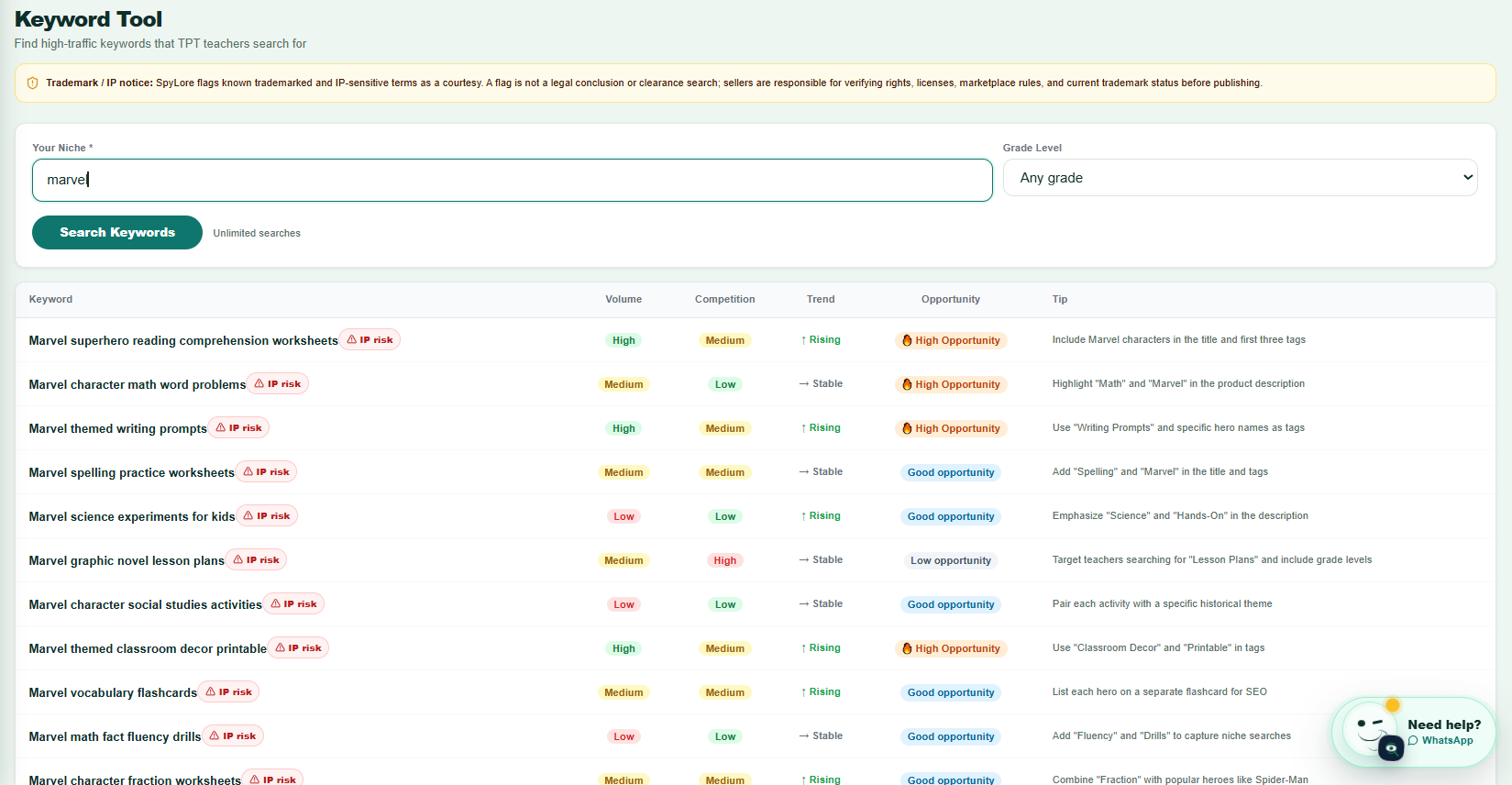
That's exactly why we built a Trademark & IP Risk check into SpyLore's Keyword Tool — it flags keywords that overlap with protected brand names (the kind of terms covered in reason #1 above) right in your research workflow, with a warning badge so you can swap the word before it ever becomes a listing.
FAQ
Can TPT permanently ban a seller account? Yes. TPT's Terms of Service allow them to close an account permanently at their discretion. Most closures are reviewable and reversible when the underlying issue is fixed and explained, but repeated or serious violations (especially copyright issues or account-sharing after a previous ban) are less likely to be reversed.
Will I still get paid if my TPT account is closed? TPT's Terms of Service state that finalized, already-earned payouts should still be paid out even after an account is closed. If a payout you're owed doesn't arrive, that's a separate issue to raise directly with TPT support alongside your closure appeal.
How long does a TPT account review take? There's no published SLA. Sellers commonly report anywhere from a few business days to a couple of weeks, especially if the issue needs a specialist team (payments vs. copyright vs. content review) to look at it.
Does using AI tools automatically get you banned from TPT? No. There's no blanket rule against using AI as part of your workflow. What gets flagged is content that reads as mass-produced, generic, or low-effort — the same outcome you'd get from low-quality content made without any AI at all.
Can I open a new TPT store after my old one was closed? This carries real risk. A new account connected to the same payout details, device, or content as a closed store is often treated as an attempt to evade the closure, and can result in both accounts being permanently banned. It's safer to resolve the original closure first.
---
*This article is based on TPT's publicly available Terms of Service, Copyright & Trademark Policy, and Content Guidelines, plus common seller reports. It isn't legal advice, and it isn't an official statement from TPT — for the exact reason your account was closed, TPT support is the only source that can confirm it.*